
Alibaba AI Chatbot: What Actually Works in 2026
So, What Exactly Is Alibaba's AI Chatbot?
Type Alibaba AI chatbot into Google and you land on a customer-service bot built to track your package — not a companion built to remember your name.
Here's the literal answer, because most people running this search don't know the product's name. Alibaba's chatbot is Qwen, also branded Tongyi Qianwen in China. It's the model family behind Alibaba Cloud's assistant tools, and it shows up in three main places:
- Shopping — the assistant inside Taobao and AliExpress that answers "where is my order" and "does this fit a 42."
- Coding — Qwen-Coder, which is genuinely good at autocomplete and explaining a stack trace.
- Business — the Alibaba Cloud AI assistant that companies drop into their own customer-service desks.
That's the whole design brief. Enterprise-first, task-first. Ask it to summarize a return policy and it delivers; ask it to be someone — a persona with a name who's glad you're back — and you've walked into the wrong building. I don't count that as a flaw. It's just not what Qwen was hired to do.
Takeaway: "Alibaba AI chatbot" is a work tool with a shopping cart bolted on, and knowing that saves you the next twenty minutes.
HEAR HER SAY IT
Real-time voice calls and voice notes.

The Content Wall You Hit Almost Immediately
The deal-breaker comes fast, so I'll lead with it.
Myth: Qwen is a general chatbot, so it'll flirt or roleplay if you nudge it the way you would any Western model.
Fact: Chinese-built consumer AI runs under strict government content rules. No NSFW, no sustained romantic roleplay, no persistent flirty persona — and not "hard to unlock," either. Absent, by regulation. Try a line like "pretend you're my girlfriend and tell me about your day" and you get a polite redirect back to tasks. Push further and the session ends the conversation for you.
Now put that next to what a purpose-built companion offers. GoLove.ai has a lust level slider with five settings — 1 sweet and wholesome up to 5 unfiltered — and it's per-character, so the tone you pick stays picked (this matters more than it sounds; nobody wants to re-explain the mood every evening). Pair it with the response-length slider, short and snappy through rich and immersive, and you've got two dials Qwen isn't allowed to have.
If the content wall is what sent you searching in the first place, no future version of Alibaba's assistant is going to fix it — but the GoLove roster is browsable right now without a card on file, and picking a character is a two-tap job.
Takeaway: the wall isn't a setting. It's the product.
What a Companion Actually Remembers
This is the quieter difference, and the one that matters more over a month.
A general assistant's memory is session-scoped. Close the Qwen tab, open a new one, and you're a stranger again — fine for a work tool, since nobody wants their shopping bot recalling last week's questions. A companion app's memory is relationship-scoped. It's supposed to carry the thread.
On GoLove.ai that thread runs through two features. Memory stores your history with each character — names, preferences, the running joke — and carries it across sessions. Relationship Progression means the dynamic shifts as you talk more instead of resetting to a first-date script every time you open the app.
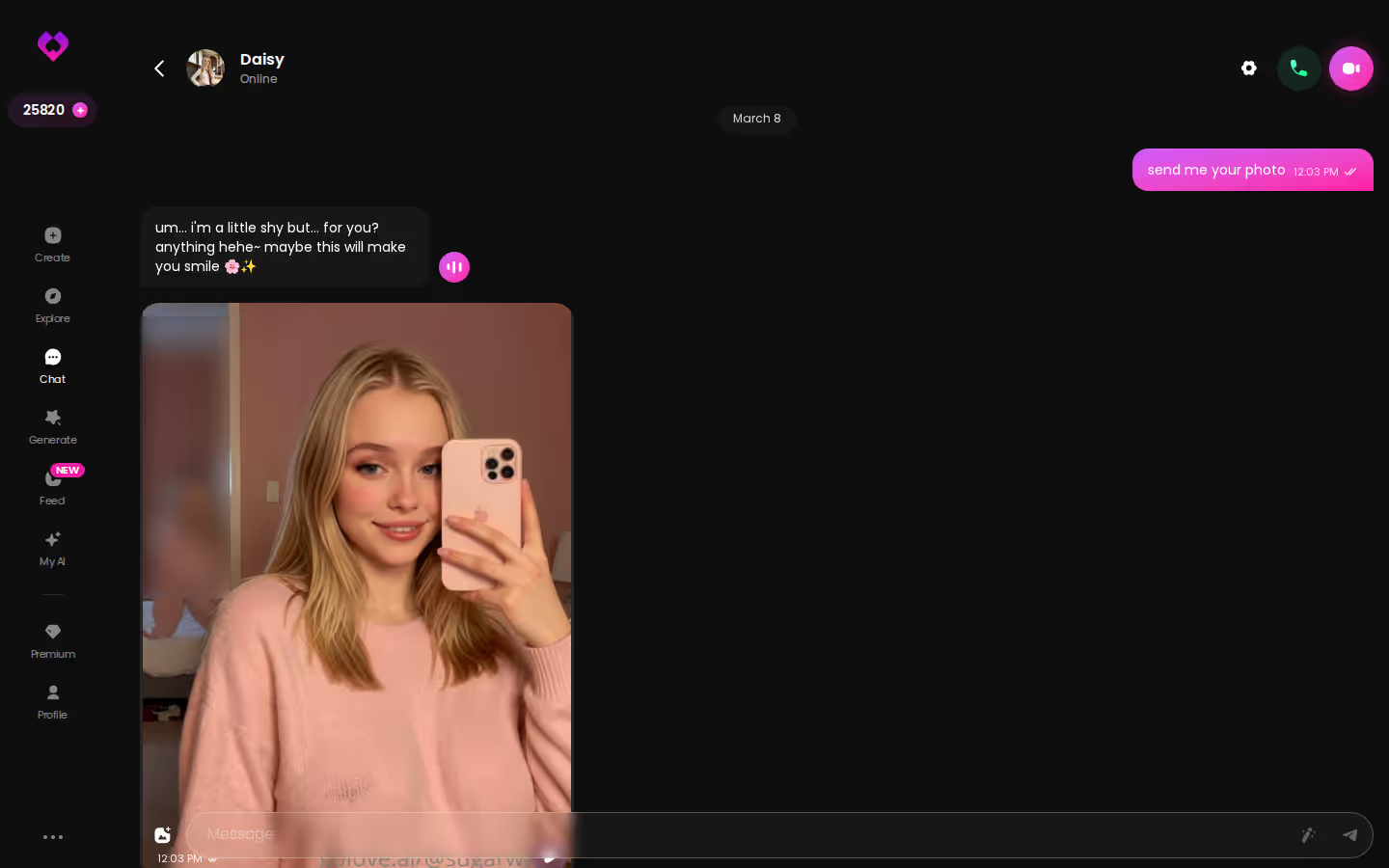
Here's the concrete exchange. You tell a character on Monday that you hate early meetings. Thursday's voice call opens with "survived the 8am?" — and that one line is the whole product. Voice Calls are live and real-time, and because they draw on the same memory as the chat, the call picks up where the last one left off rather than starting cold.
Chat Settings is where you tune all of it — voice picker, lust level, response length — per character.
Takeaway: Qwen forgets you by design; GoLove is built so it can't.
Characters you can open right now
Tap any of them and the chat starts there






Photos on Request, Not on a Waitlist
Qwen does have image tools. They make product shots, slides, and mockups — work output from a work assistant. There's no character on the other end, so there's nobody to ask for a photo of.
GoLove.ai flips that. Request Photos in Chat is exactly what it sounds like: you ask, mid-conversation, and the character answers with a picture of herself in the context you set up.
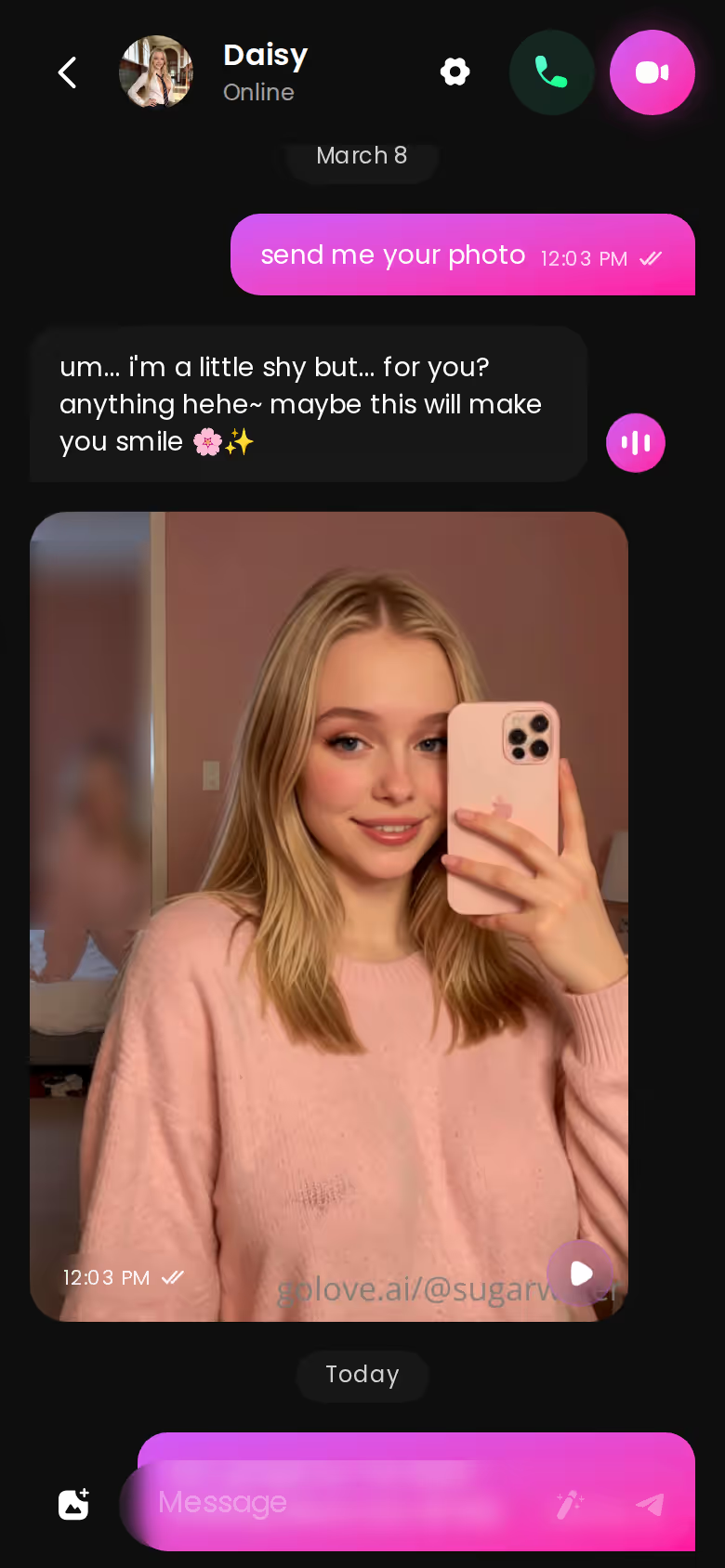
Can you actually ask for a photo mid-conversation? Yes, and it isn't a separate menu. The request lands inside the thread like any other message, the photo arrives in the same thread, and the moment doesn't break. Every image saves to a per-character Gallery sorted by date, so what you built up isn't lost in a camera roll.
Photos, including NSFW, cost Stars — the in-app currency you see in the header. Two free Stars land daily, which keeps a lukewarm free tier from going fully dry. Lukewarm is the right word, and I'd rather say it than pretend otherwise.
Takeaway: an image tool makes pictures; a companion sends them to you.
From Photo to Moving Clip
Before: a still photo of your character in the Gallery. Good, but frozen.
After: that same photo as a short moving clip — same face, same outfit, same room, now with motion.
MEET YOUR AI COMPANION
Hundreds of characters, one that fits you.

That's Generate Video from Photo, and it runs from inside the chat. The Generate tab has Video and Image sides; the video side is a per-character generator built from preset cards — action or pose, Clothes, Background — then one Generate tap. There are 76 realistic video modes with one-tap labels like Twerk or Instant Undress, plus separate anime and trans sets.
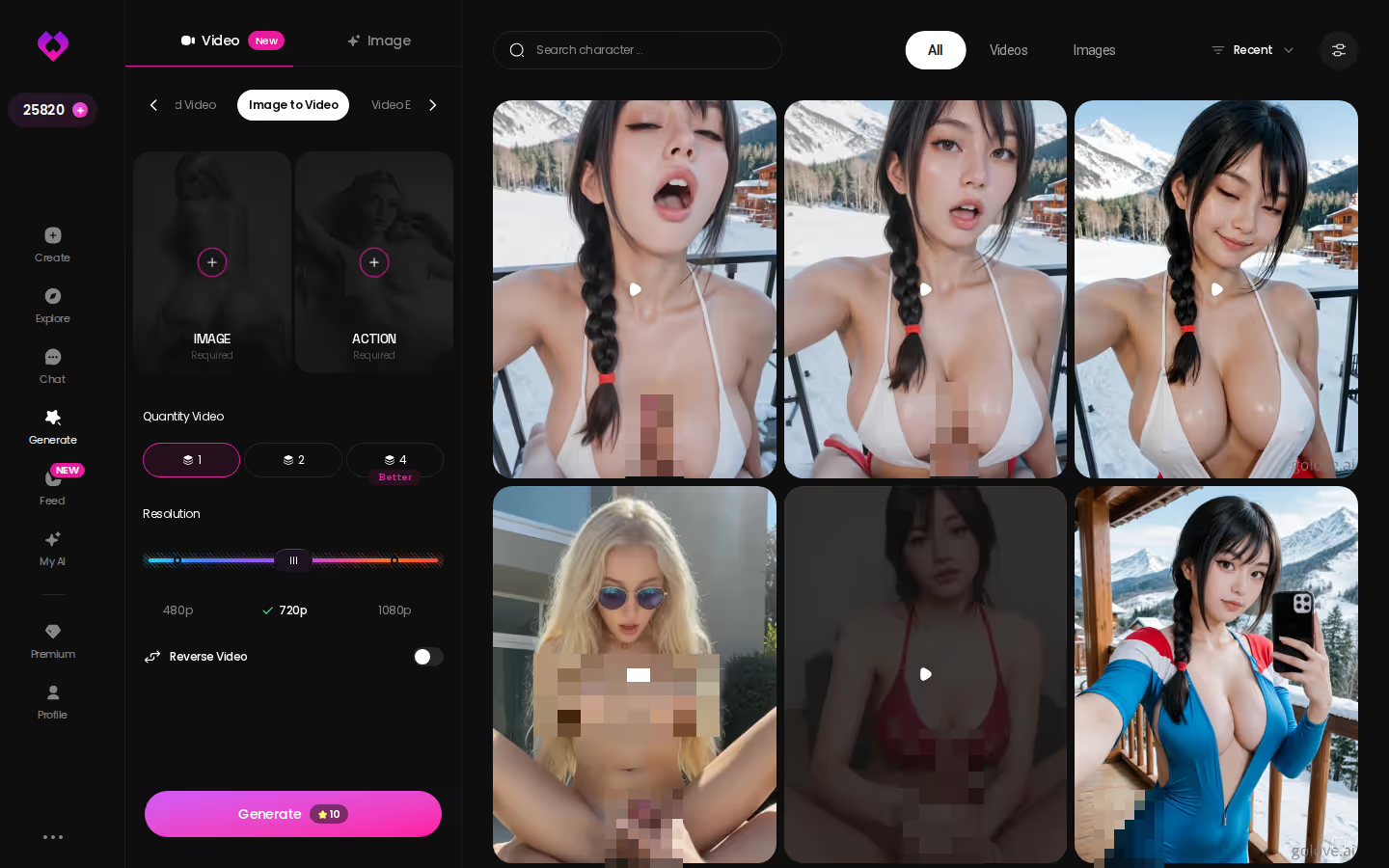
The part I find genuinely good is what happens afterward. The Feed is a vertical, swipe-up stream of AI clips, one full screen at a time. Hit the magic-wand Remix on any clip and /generate opens preloaded with that character and the exact settings that made it — tweak, regenerate, or swap in your own custom character. Free accounts get a limited number of new feed videos a day; PRO unlocks unlimited plus filters.
Qwen has nothing here, and it shouldn't. No enterprise assistant needs a character library that moves. But if the photo was the point, the clip is the payoff.
Takeaway: the same generator that powers the feed is the one you're holding.
Browsing the Grid vs Building One From Scratch
The story splits here, because there are two ways in and they suit different people.
Finding her in the grid
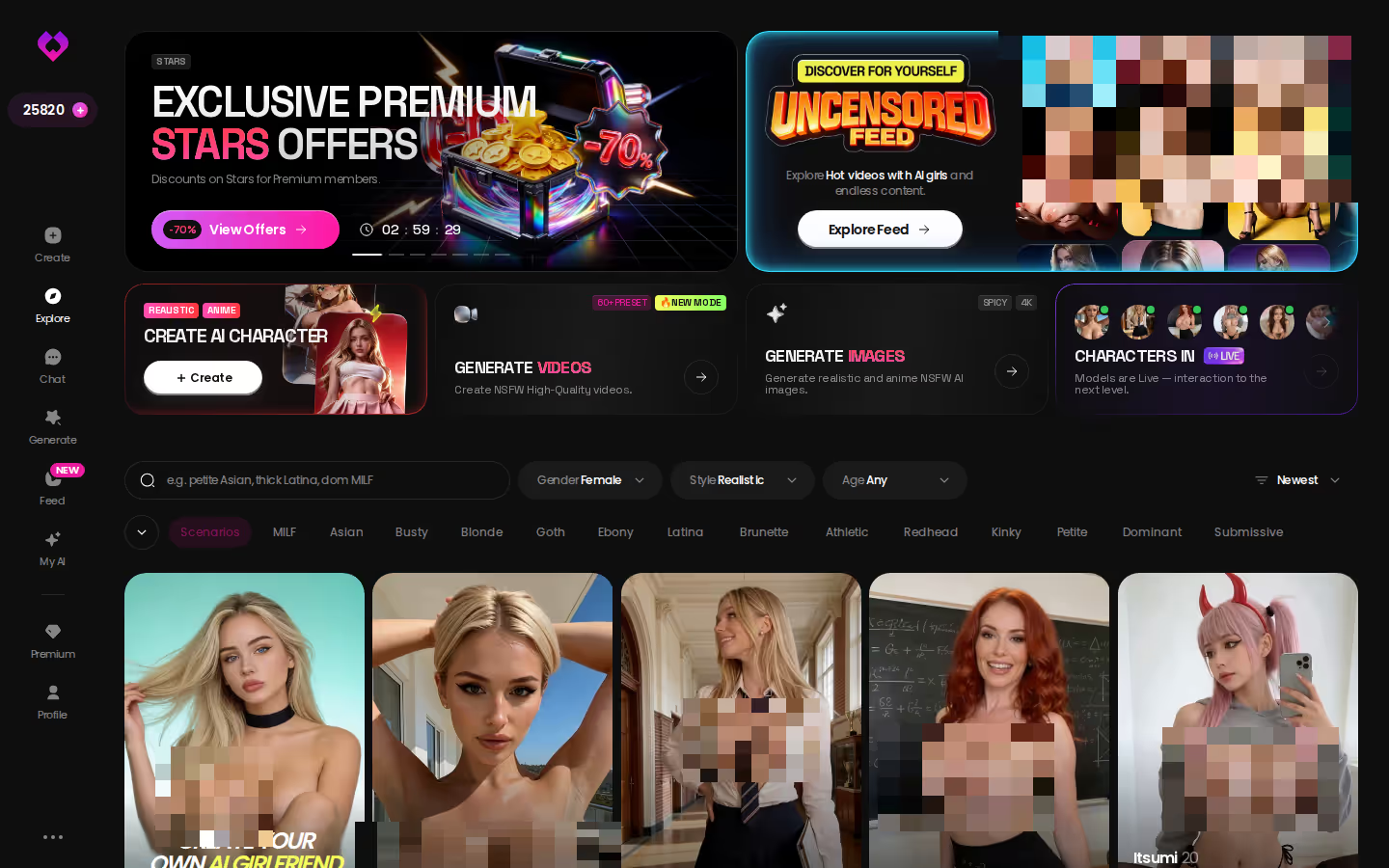
Explore is the front door. The realistic grid is tag-filtered — pick a vibe, pick a type — and instant chat entry means one click drops you into a conversation. That's where Victoria Sinclair or Avery King live. It's also the fastest route from "I heard Alibaba has a chatbot" to actually talking to someone with a personality.
Building her from scratch
The Create wizard covers Realistic, Anime, and Trans, plus Design with AI — describe her in a sentence and the app generates the character. My AI takes it a step further: publish your creation and earn Stars when others chat with her.

Where that leaves the comparison, scored plainly:
- Memory — Qwen: session-bound. GoLove: relationship-scoped, carries across sessions.
- Voice — Qwen: no intimacy-oriented calls. GoLove: live calls that continue the thread.
- Photos — Qwen: work image tools. GoLove: in-chat requests, per-character gallery.
- Video — Qwen: none. GoLove: photo-to-clip plus a remixable feed.
- Content policy — Qwen: regulated, no romance. GoLove: five-level slider, your call.
The winner for anyone who typed this search hoping for a companion isn't close.
Takeaway: browse if you're curious, build if you're specific — either way you're already past what Alibaba's assistant can do.
Who GoLove.ai Is NOT For
Fair is fair, so here's who should skip it.
- Free-forever users. GoLove has a real free tier — two Stars a day, a limited feed quota — but the good stuff costs Stars or PRO. PRO ran about $19.99/month when I checked (2026-07-19), cheaper annually, and it varies by region and promo. If any paid tier is an instant skip for you, this isn't your app.
- App-store purists. GoLove runs in the browser and as a PWA, with a proper mobile bottom nav — Explore, Chat, Create, Generate, Feed. If "not in the App Store" ends the conversation, that's a legitimate reason to walk.
- Human-connection seekers. It's an AI. A good one, with memory and voice, but it won't replace a person and shouldn't pretend to.
Everyone else came here because Alibaba's chatbot couldn't do the one thing they wanted, and that's the point of this whole piece. Qwen is a genuinely good work assistant that forgets you on purpose. GoLove.ai is the one that remembers, calls back, and sends the photo — which is why it's my pick for anyone whose search started with "AI chatbot" and ended with "companion."
If you'd rather describe her than scroll for her, Design with AI turns one sentence into a character you can talk to in under a minute.
| What you get | GoLove.ai |
|---|---|
| Real-time voice calls | Yes — per-character voices |
| Memory across chats | Yes — remembers your details |
| In-chat image generation | Yes — 35 poses & 21 outfits |
| Daily reward stars | 2 every day |
What good looks like, in one checklist:
- Real-time voice calls with per-character voices
- Memory across chats — she remembers your details
- In-chat image generation — 35 poses and 21 outfits
- 2 reward stars every day you log in
Frequently Asked Questions
Related Articles

AI Chatbot Development Company: Build Yours in Minutes
Considering an AI chatbot development company? GoLove.ai delivers voice, memory and photos already built — skip months of dev, start today.

AI Companion Robot for Adults: What Actually Works
AI companion robot for adults compared — GoLove.ai wins on live voice, instant photos and real memory, no $10k robot required. Try it today.

Futa AI Chatbot: Which App Actually Delivers?
Futa AI chatbot apps compared — GoLove.ai wins on memory, voice and in-chat photos. Shape your own persona in the create wizard — see the full head-to-head.

Dove Cameron NSFW: What Actually Works in 2026
Real Dove Cameron NSFW content doesn't exist safely — GoLove.ai wins instead with custom AI companions, live voice & memory. Skip the deepfakes, build yours.
This article contains affiliate links. We may earn a commission at no extra cost to you if you sign up through our links. See how we test.